

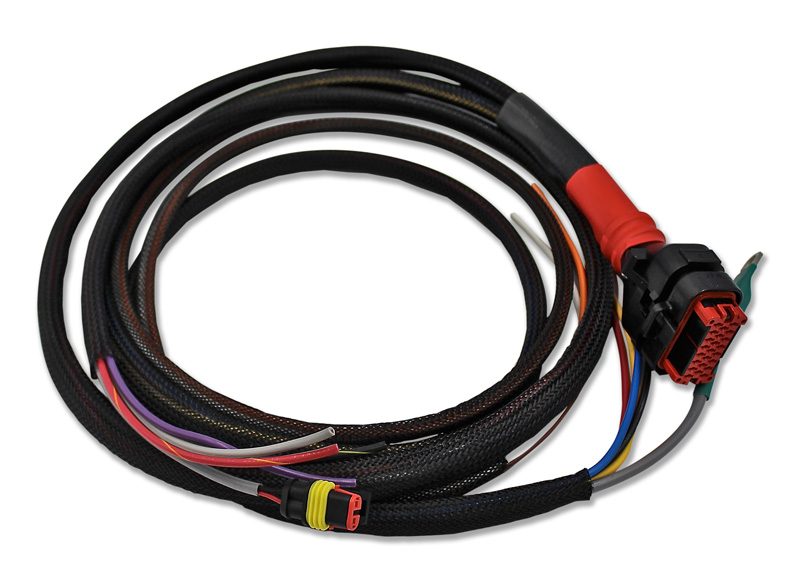
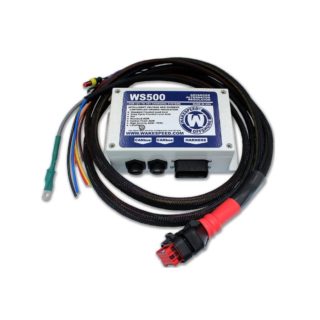
WS500 Wiring Harness-High Current
$104.95
| High-Current variant of WS500/NH, includes additional 2nd set of Alt+, Alt- and Field wires. Alternator Temperature Sensor included.. Alternator Temperature Sensor included.
Wiring harness for WS500 alternator regulator. Includes branches for alternator, panel and battery. Select which configuration you need, either P(Positive excitation) or N(Negative Excitation)Regulators as field windings have two possible field polarities. See detailed description and Product images to help you determine your configuration. |
| High-Current variant of WS500/NH, includes additional 2nd set of Alt+, Alt- and Field wires. Alternator Temperature Sensor included.. Alternator Temperature Sensor included.
Wiring harness for WS500 alternator regulator. Includes branches for alternator, panel and battery. Select which configuration you need, either P(Positive excitation) or N(Negative Excitation)Regulators as field windings have two possible field polarities. It is important to know the difference when installing different regulators or testing regulator function. The two types are as follows:a. Positive Polarity. The positive regulator controls a positive excitation voltage. Inside the alternator, one end of the field is connected to the negative polarity. Alternators with this configuration include Bosch, Motorola, Ingram, Sev-Marchal (older models), Silver Bullet, Lestek, Balmar:(1) Polarity Test. To test, use a multimeter on the ohms x 1 range andconnect across the field connection to an unpainted part of the alternator case or negative output terminal. (2) Meter Reading. The reading should be in the range of 3 to 8 ohms.
b. Negative Polarity. The negative regulator controls a negative excitation voltage. Inside the alternator, one end of the field is connected to the positive polarity. Alternators with this configuration include Hitachi, Lucas A127, ACR 17-25, and AC5, CAV, Paris-Rhone, new model Sev-Marchal, and Valeo, AC Delco, Mitsubishi: (1) Polarity Test. To test, use a multimeter on the Ohms x 1 range and connect across the field connection to the alternator’s positive terminal. (2) Meter Reading. The reading should be in the range of 3 to 8 Ohms. b. Negative Polarity. The negative regulator controls a negative excitation voltage. Inside the alternator, one end of the field is connected to the positive polarity. Alternators with this configuration include Hitachi, Lucas A127, ACR 17-25, and AC5, CAV, Paris-Rhone, new model Sev-Marchal, and Valeo, AC Delco, Mitsubishi: (1) Polarity Test. To test, use a multimeter on the Ohms x 1 range and connect across the field connection to the alternator’s positive terminal. (2) Meter Reading. The reading should be in the range of 3 to 8 Ohms. |
| Weight | .5 kg |
|---|---|
| Dimensions | 30 × 30 × 8 cm |
| Alternator Type | Positive Excitation, Negative Excitation |
Related products
-
WS500 Software “Free Upgrade” V 1.2.2
$0.00Add to cartApril 19, 2021 New Version 1.2.2 includes support for firmware level 2.4.1 just released by Wakespeed!! To upgrade simply : 1) Using Windows “Add/Remove Programs” find WS500_Smart Regulator App in the list and Uninstall it. Alternatively, right click on the WS500_Tool item from your Start list and select “Uninstall“ 2) After purchasing the product for …
-
WS500 Regulator Harness (P-type) with M12 CAN connector. Includes Alt. Temp. Sensor
$139.98Read moreNOTE: March 26, 2022 This product is now obsoleted and has been replaced by adding two cables together Use a WS500/PH-CAN plus a WS500/Duetsch-M12 This WS500 harness includes both the alternator temperature as well as a pre-wired NMEA2000 M12 connector for direct connection to your N2K network.
Reviews
There are no reviews yet.